Process
Zero downtime database migration: how close can you get?
Truly zero downtime is not possible: at cut-over, clients cannot process requests for a short time. You control how short. Copy the data, stream changes with change data capture (CDC), and cut over only when lag is low (in seconds).
Datalobe Editorial Team, Reviewed by Ramesh Damma, Chief Product and Technology Officer, Soulpage IT Solutions, Updated , 11 min read
Key takeaways
- Zero downtime database migration is a goal, not a guarantee. Truly zero downtime is not possible, and Google Cloud's documentation says so. Plan for minimal downtime and agree the number with the business.
- The window you control has four parts: drain writes, apply the last changes, verify, and switch clients.
- CDC shrinks that window, because the bulk copy happens while the source stays in use. Lag tells you when to go.
- Set a lag threshold and a go/no-go rule before the night, then rehearse them.
- Decide the rollback path before the first write lands on the target.
What does zero downtime really mean?
Zero downtime database migration is a goal, not a guarantee. Google Cloud says so directly in its database migration concepts and principles guidance:
"In a migration, achieving truly zero downtime for clients is impossible; there are times when clients cannot process requests."
The same page says you can shorten that time. So the useful question is not whether there is an outage. It is how long the outage lasts.
Agree that number with the business before the night of the move, not during it.
In this article, the cut-over window is the time between the last write on the old database and the first write on the new one.
It has four parts: drain writes, apply the final changes, verify, and switch clients. Each part can be timed in rehearsal.
Example run · ERP-Oracle to ERP-PG, Meridian Retail (example): application downtime was 18 min.
Use a figure like that as a planning anchor for the conversation. It is not a promise for your own system.
Zero, near-zero and minimal downtime
People use three terms for the same goal, and they are not the same promise.
Zero would mean clients never wait. Nobody can promise that at the moment of the switch.
Near-zero and minimal both mean a short, planned pause.
Google's page has a section that compares zero, minimal and significant downtime. It calls the techniques that shorten the pause near-zero.
Significant downtime is sometimes fine. The same page notes that in some migrations it is acceptable.
An internal reporting database that nobody uses on Sunday may not need CDC at all. A simple offline copy can be the right answer.
Where the downtime actually comes from
Downtime is rarely one event. It is the sum of a few small ones:
- Write freeze or drain. Stopping the writers and waiting for open transactions to finish.
- Final sync. Applying the last changes to the target.
- Validation. Checking row counts and key totals before you switch.
- The switch. Changing connection strings or DNS, then restarting or reconnecting clients.
- Warm-up. Sequences, caches, connection pools and table statistics on the new database.
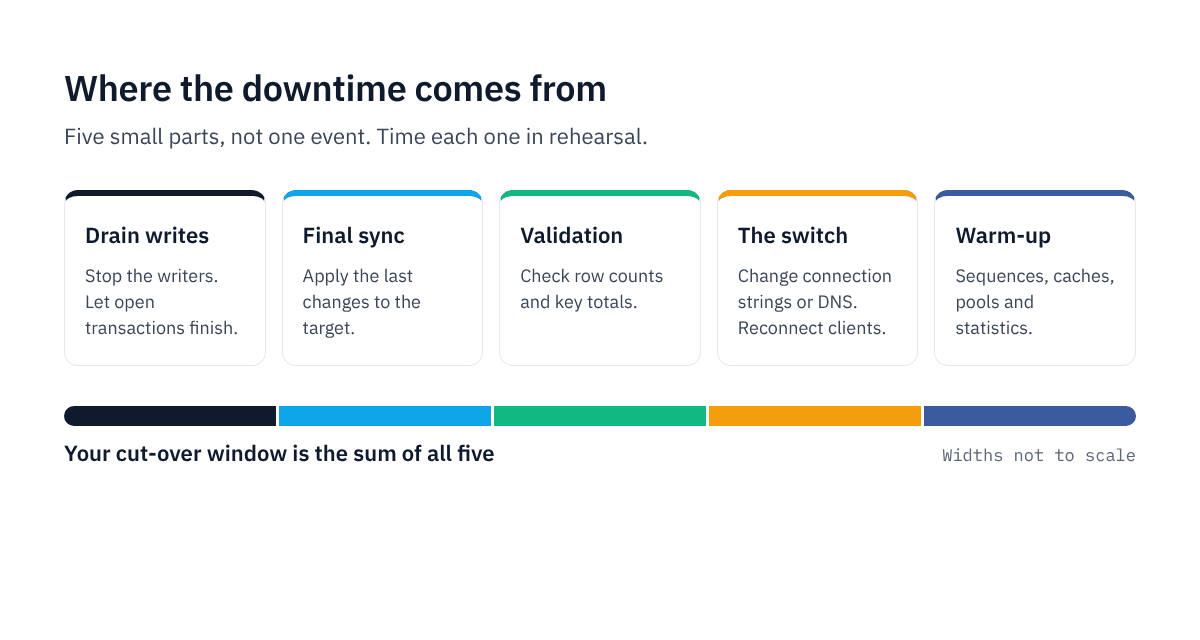
Time every part in rehearsal. The planning steps that go with this sit in the database migration checklist.
Which migration approach fits your system?
Four approaches cover most moves. They differ in how long writes stop, whether they cross engines and how you go back.
| Approach | Realistic downtime | Rollback path | Works across engines | Complexity |
|---|---|---|---|---|
| Offline copy | Writes stop for the whole copy plus the switch | Simple: the source is untouched | Yes | Low |
| Replica or standby switchover | A short pause for promotion and the client switch | Possible, but you plan it | No, same engine only | Medium |
| CDC-based migration | A short pause for the final drain and the switch | Simple before the first target write | Yes | Medium to high |
| Dual write and shadow reads | Can be very short, but the app carries the risk | Switch reads back to the source | Yes | High |
Offline copy and cold cut-over
Stop the application, copy everything, and point clients at the new database. It is the simplest plan and the easiest to reason about.
Downtime lasts as long as the copy plus the switch. That suits small databases and planned maintenance weekends.
The source stays untouched, so going back is easy.
Read replica or standby switchover
Build a copy on the same engine that stays in sync, then promote it. The pause is the promotion plus the client switch.
It needs the same engine on both sides. That makes it a good fit for moving hosts and a poor fit for changing engines, such as Oracle to PostgreSQL.
CDC-based migration
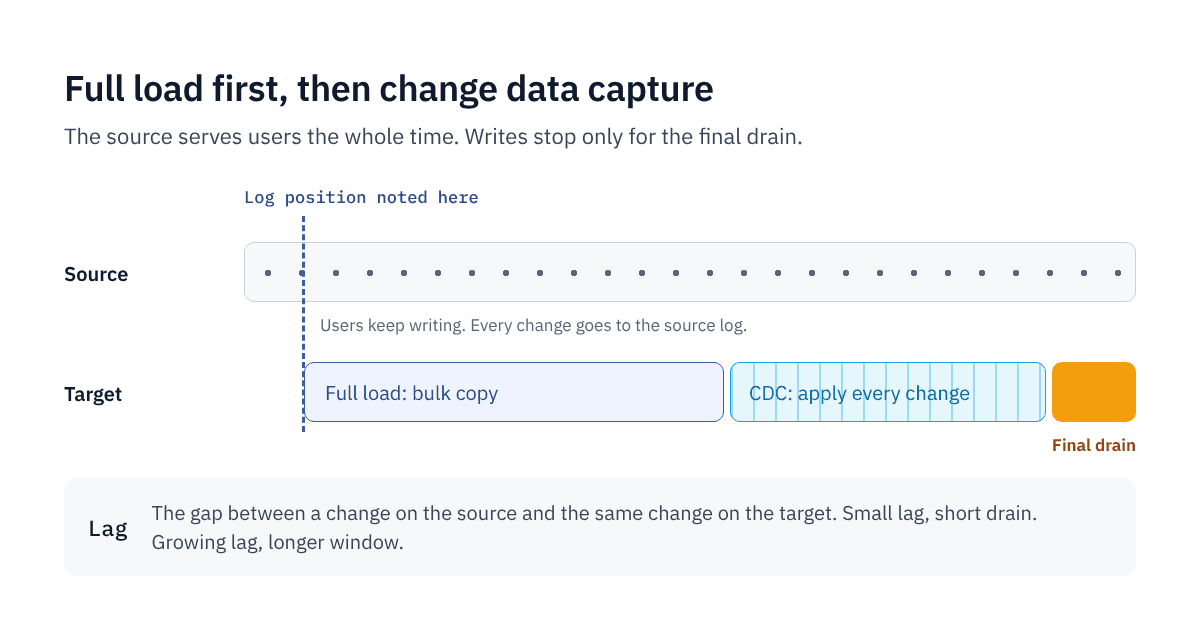
Copy the data once, then stream every change from the source log. Writes stop only for the final drain.
It works across engines, because it reads changes rather than storage blocks. It also adds moving parts: log access, lag to watch and sequences to fix.
Most of this article is about this approach.
Dual write and shadow reads
The application writes to both databases. It may also read from the new one in the background and compare the answers.
This gives the most control and takes the most work. Two writes are not one transaction. One can succeed while the other fails, and the databases drift apart.
Treat it as an application project with its own tests. For a pure data move it is usually the last choice.
Blue-green and canary rollouts, borrowed from application releases, sit on top of these. They decide how traffic moves to the new database. They do not decide how data arrives.
How does CDC shorten the cut-over window?
Full load first, then change data capture
Start by copying the data while the source stays in use. Note the log position where the copy began. Then apply every change made since that point.
The source serves users the whole time. Downtime is only the final drain, not the copy.
Lag is the gap between a change on the source and the same change on the target.
When lag is small, the final drain is short. When it grows, so does the window.
Checking logical replication on PostgreSQL
The SQL in this article assumes PostgreSQL to PostgreSQL logical replication, the setup used in a version upgrade.
It also assumes a publication and a subscription already exist.
Other source engines expose lag in their own ways. Check your tool's documentation for the equivalent.
Start with the replication slot. An inactive slot keeps WAL on the source until the subscriber consumes it, and the disk can fill.
Tested on PostgreSQL 16.15.
-- Run on the publisher (source) database.SELECT slot_name, active, wal_status, pg_size_pretty(pg_wal_lsn_diff(pg_current_wal_lsn(), restart_lsn)) AS retained_walFROM pg_replication_slotsWHERE slot_type = 'logical';Output from our test, with a healthy subscription and an idle source:
slot_name | active | wal_status | retained_wal ------------+--------+------------+-------------- sub_orders | t | reserved | 56 bytes(1 row)Check it regularly during the sync, at least daily. Retained WAL that keeps growing while the subscriber is stopped is an alert, not a curiosity.
In our test we disabled the subscription and kept writing to the source. The slot went inactive and retained WAL grew across three readings:
sub_orders | f | reserved | 125 MB sub_orders | f | reserved | 289 MB sub_orders | f | reserved | 499 MBNext, read the lag itself. A running subscription appears as a row whose application_name is the subscription name (in our test).
Tested on PostgreSQL 16.15.
-- Run on the publisher (source) database.SELECT application_name, state, pg_wal_lsn_diff(pg_current_wal_lsn(), replay_lsn) AS lag_bytes, replay_lagFROM pg_stat_replication;Output from our test, healthy and idle:
application_name | state | lag_bytes | replay_lag ------------------+-----------+-----------+------------ sub_orders | streaming | 0 | (1 row)The time columns can be empty when nothing has changed recently, so read the byte difference as well.
With the subscription disabled, this query returned no rows in our test. Use the slot query above to spot a stopped subscriber.
Reading lag before you decide
One reading proves little. Read lag several times, at busy and quiet moments, and look at the trend.
Bytes behind and seconds behind tell different stories. A large batch job adds many bytes that may clear in seconds.
Set the threshold with your team. It is a team decision. It is not an industry standard, and it is not a Datalobe rule.
Choose it from the final drain you can accept, then test that choice in rehearsal.
What changes when engines differ?
A move between engines adds work that a same-engine move does not. Three items cause most of the surprises.
Sequences. PostgreSQL 16 logical replication does not replicate sequence data. Check what your CDC tool does too.
After the last change is applied, set each sequence beyond the largest key.
Tested on PostgreSQL 16.15.
-- Run on the target database. The sequence and table names are examples.SELECT setval('public.orders_id_seq', (SELECT COALESCE(max(id), 0) + 1 FROM public.orders), false);Output from our test, on a table of 1,000,000 rows:
setval --------- 1000001(1 row)The last argument, false, means the next value handed out is exactly the number you set. Reset sequences after the final apply, never before.
Triggers on the target. If a target trigger fires while changes are applied, it can write the same change twice.
Native PostgreSQL logical replication does not fire ordinary triggers on the subscriber by default.
Other tools may behave differently. Check how yours applies changes, and test one table before the full run.
Types and rounding. Type mapping can change values. Some Oracle Database NUMBER columns can need a chosen target scale.
PostgreSQL rounds values beyond a column's declared scale.
The Oracle to PostgreSQL migration path shows how these differences are handled.
How do you run a lag-gated cut-over?
A lag gate means you cut over only when lag is under a threshold you set in advance. It turns a nervous judgement into a yes or no.
Before the window
- Rehearse the full sequence on a copy and time each part.
- Run validation on the rehearsal. Row counts alone are not enough, so add checksums on large tables. See Datalobe validation.
- Take several lag readings and confirm they sit under your threshold.
- Write the rollback path down and agree it.
- Test clients in read-only mode against the target well before the switch, as Google's guidance suggests.
- Name the one person who makes the go/no-go call.
Pick a quiet window. One example window is a Sunday night in US Eastern time, but your own traffic data decides.
During the window
- Stop the writers, or set the source to read-only.
- Wait for lag to reach your threshold, so the last changes apply.
- Reset the sequences on the target.
- Run the go/no-go checks.
- Switch clients to the target.
- Watch the first requests and the error rate.
The first check reads lag on the source once writes have stopped. The threshold below is an example value; set your own.
One logical slot is expected here. If logical_slots is not what you expect, or lag_ok is false, stop.
The query returns false when no slot exists, so a missing slot cannot read as a go.
Tested on PostgreSQL 16.15.
-- Run on the publisher, in psql, after writes have stopped.\set max_lag_bytes 1048576SELECT count(*) AS logical_slots, COALESCE(bool_and(pg_wal_lsn_diff(pg_current_wal_lsn(), s.confirmed_flush_lsn) <= :max_lag_bytes), false) AS lag_okFROM pg_replication_slots sWHERE s.slot_type = 'logical';Readings from our test, with the 1 MB threshold above:
Healthy and caught up: logical_slots 1 | lag_ok tSubscription disabled, 100,000 rows written: 1 | fAfter re-enabling and catch-up: 1 | tThe lag is measured from confirmed_flush_lsn, the point up to which the subscriber has confirmed receiving data.
If the publisher has other logical slots, filter by slot_name. Otherwise an unrelated stale slot will turn the gate false.
The second check runs on the target. It compares a row count with a count taken on the frozen source.
It also checks that the sequence is ahead of the largest key.
Tested on PostgreSQL 16.15.
-- Run on the target, in psql. Replace source_rows with the count from the frozen source.\set source_rows 1000000SELECT (SELECT count(*) FROM public.orders) = :source_rows AS rows_match, (SELECT CASE WHEN is_called THEN last_value + 1 ELSE last_value END FROM public.orders_id_seq) > (SELECT COALESCE(max(id), 0) FROM public.orders) AS sequence_ahead;Output from our test. Before the sequence reset, the sequence still sat at its start value:
rows_match | sequence_ahead ------------+---------------- t | f(1 row)After the sequence reset:
rows_match | sequence_ahead ------------+---------------- t | t(1 row)Go only if every value is true. If one is false, stop, decide, and write down why.
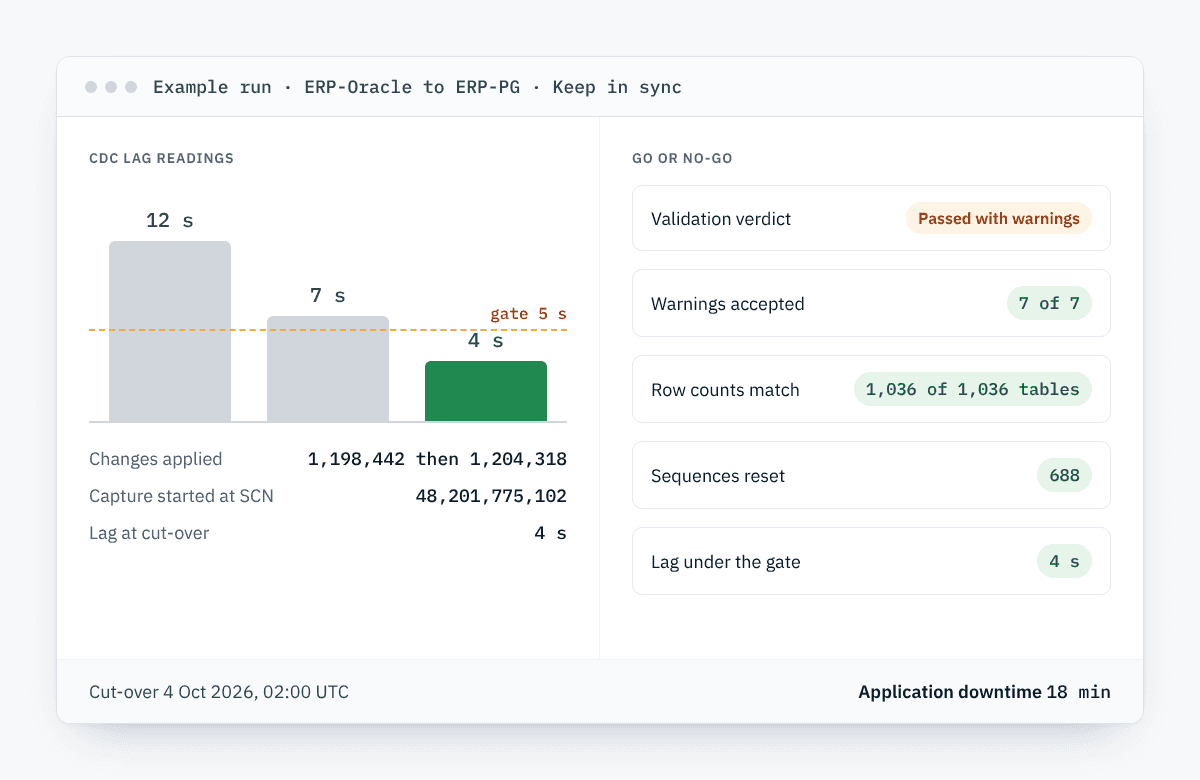
Example run · ERP-Oracle to ERP-PG, Meridian Retail (example): cut-over on 4 Oct 2026 at 02:00 UTC. CDC lag was 4 s at cut-over. Application downtime was 18 min.
After the window
- Watch error rates and response times against what you saw before.
- Keep the source read-only and intact until you decide to retire it.
- Record the timings of each part, so the next window is shorter.
- Set a date to retire the source, and tell the people who depend on it.
How do you roll back after cut-over?
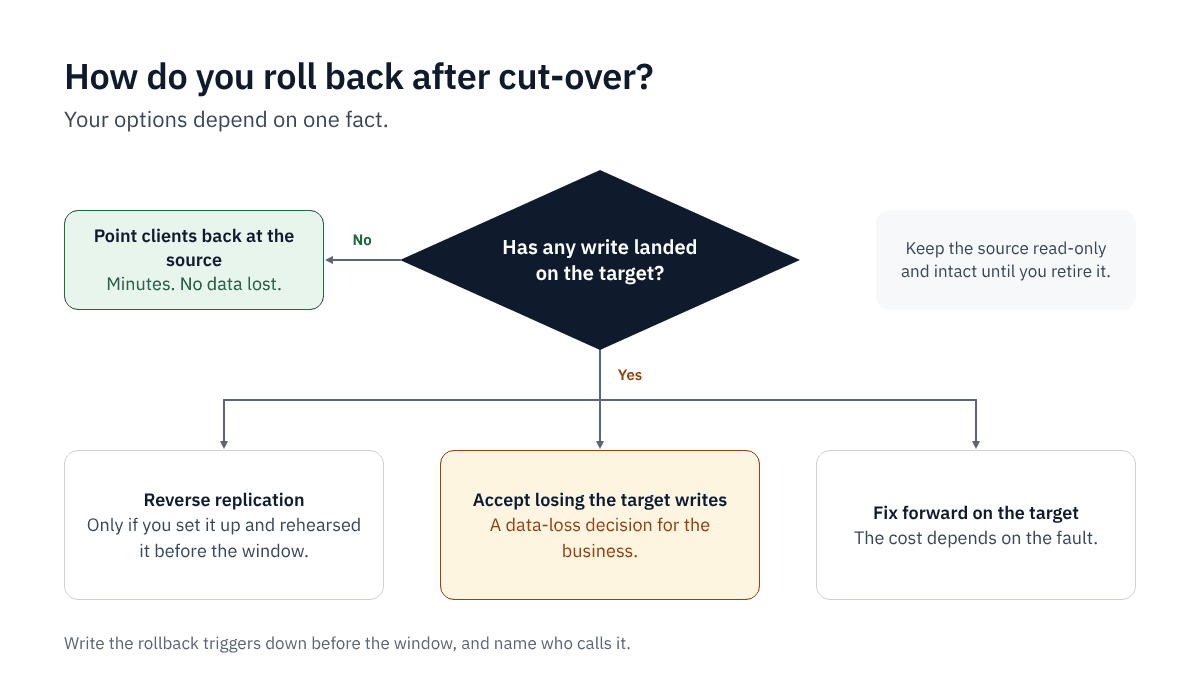
Your options depend on one fact: has any write landed on the target yet?
| Moment | Option | What it costs |
|---|---|---|
| Before the first target write | Point clients back at the source | Minutes, and no data is lost |
| After the first target write | Reverse replication from target to source, if you set it up beforehand | Setup and testing before the window |
| After the first target write | Go back and accept losing the writes made on the target | A data-loss decision for the business |
| After the first target write | Fix forward on the target | Depends on the fault |
Write the rollback triggers before the window. Examples are a failed go/no-go check, or an error rate above a level you agreed.
Reverse replication is not something to build in the small hours. If you want it, set it up and rehearse it in advance.
Keep the source read-only and intact until you retire it. That is what makes the first row of the table possible.
How does Datalobe handle the cut-over?
Datalobe copies the data in checkpointed batches, then keeps the target in sync with CDC until cut-over.
Datalobe data migration shows lag and the validation verdict, so the operator chooses when to cut over.
Org admins and Operators can cut over with CDC. The Migration Report records the lag and the downtime. The goal is minimal downtime, measured and recorded.
CDC readiness is one of the stages of the Datalobe assessment.
Send a read-only connection or a schema export. We deliver your Assessment Report within 5 working days of receiving it.
Share this article
Frequently asked questions
Is zero downtime database migration really possible?
No. Google Cloud's documentation says truly zero downtime for clients is impossible in a migration. The realistic aim is minimal downtime: a short, planned window that you have measured in rehearsal.
What is the difference between zero downtime and near-zero downtime?
Zero would mean clients never wait, which no migration can promise. Near-zero means a short, planned pause while the last changes apply and clients switch to the new database.
How does CDC reduce downtime during a migration?
CDC copies changes from the source log while the application keeps running. At cut-over only the last few changes remain, so writes stop briefly instead of for the whole copy.
How do you roll back a database migration after cut-over?
Before the first write reaches the new database, point clients back at the untouched source. After that, you need reverse replication set up in advance, or you accept losing the new writes.
How do you migrate Oracle to PostgreSQL with minimal downtime?
Copy the data, stream changes with CDC, and cut over when lag is low. Reset sequences and validate first. See the [Oracle to PostgreSQL migration steps](/migrate/oracle-to-postgresql) for detail.
Sources
- Google Cloud, Database migration: Concepts and principles (Part 1), page last updated 2025-04-29, accessed
- PostgreSQL 16 documentation: Logical replication, Restrictions, accessed
- PostgreSQL 16 documentation: Logical replication, Architecture, accessed
- PostgreSQL 16 documentation: Log-shipping standby servers, Replication Slots, accessed
- PostgreSQL 16 documentation: pg_replication_slots, accessed
- PostgreSQL 16 documentation: Cumulative statistics, pg_stat_replication, accessed
- PostgreSQL 16 documentation: Sequence manipulation functions, accessed
- PostgreSQL 16 documentation: Numeric types, accessed
About the authors
Datalobe product and engineering staff at Soulpage IT Solutions
The Databloe Editorial Team is the Datalobe product and engineering staff at Soulpage IT Solutions. The team writes the articles and guides on this site about converting code objects, moving data and validating database migrations. Before an article is published, it needs an approved brief, a recorded check that its examples were run, and the final approval of a named reviewer.
- Reviewed by
- Ramesh Damma, Chief Product and Technology Officer, Soulpage IT Solutions
- Last updated
Share this article
Related articles
Database migration checklist: evidence to keep and who signs, phase by phase
By Datalobe Editorial Team, , 14 min read
A database migration checklist in seven phases. Each ends with the evidence to keep and the role that signs, plus a printable table for your team.