Process
Database migration checklist: evidence to keep and who signs, phase by phase
A database migration checklist works when every phase ends in proof, not a tick. This one has seven phases, from scope to source decommission. Each lists the evidence to keep and the role that signs it, so an auditor can check the file later without asking the team.
Datalobe Editorial Team, Reviewed by Ramesh Damma, Chief Product and Technology Officer, Soulpage IT Solutions, Updated , 14 min read
Key takeaways
- This database migration checklist has seven phases. Each one ends with "Evidence to keep" and a "Who signs" line.
- Row counts alone do not prove a migration. Compare data per table and keep the results.
- The person who starts a run can never approve it in Datalobe.
- A cut-over aims for minimal downtime, not zero. The example run shows 18 min.
- The finished sheet, with the evidence behind each line, is the file you hand to your auditor.
How to use this checklist
Evidence is a file a stranger can read. It shows what was checked, who produced it, when, and from which system.
A screenshot with no date and no author does not count.
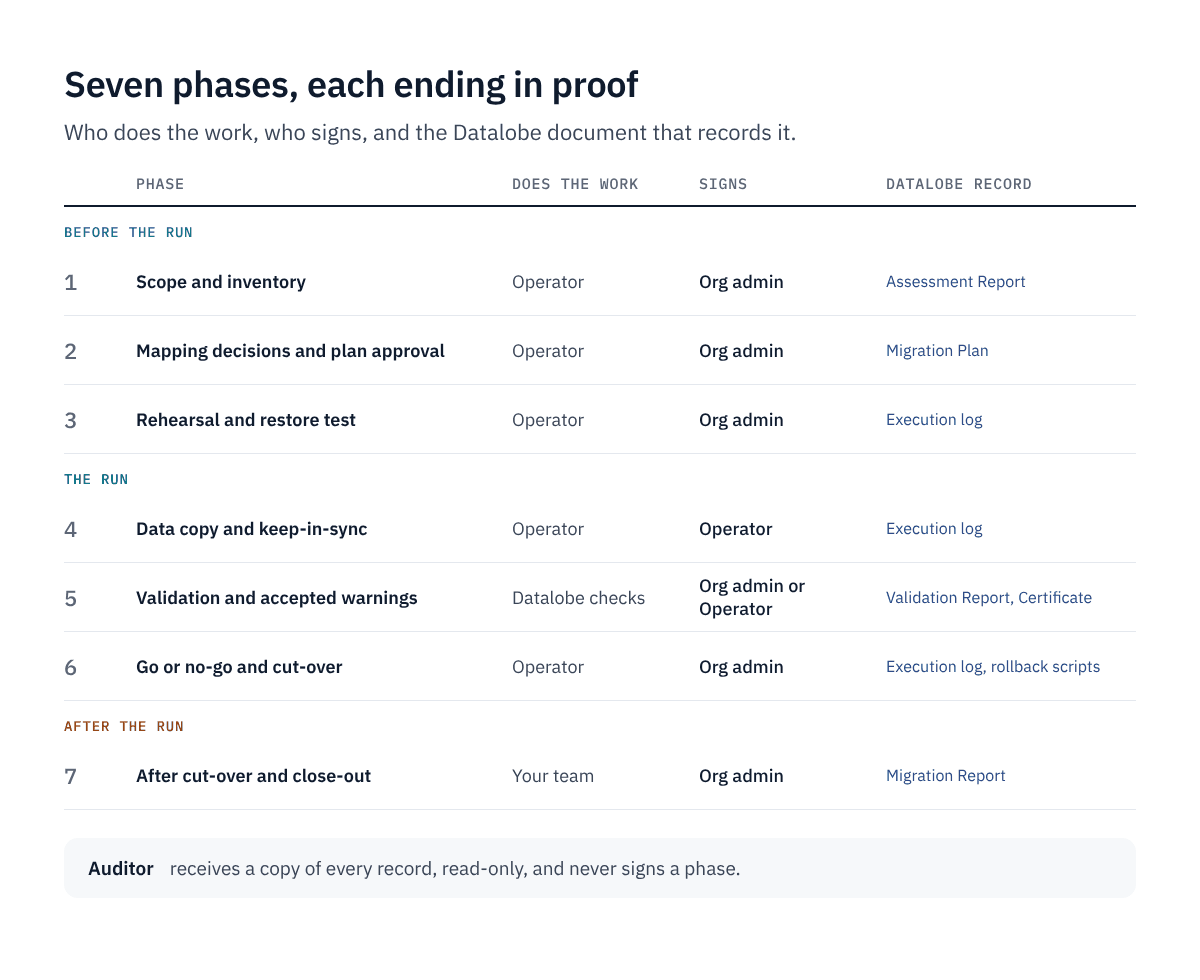
Phases 1 to 3 are your pre-migration checklist for a database. Phase 7 is your post-migration checklist. Phases 4 to 6 cover the copy, the checks and the switch.
Each phase has the same blocks, in the same order. A short lead explains the point. A tick list gives the checks.
Then come the evidence to keep and the signer.
The list does not depend on your source or target. Notes that depend on the path, such as type and collation differences, sit on the migration path pages.
The sheet uses the four public Datalobe roles. See how Datalobe works for the full table of what each role can do.
- Org admin: the data owner or approver. Approves runs, accepts validation warnings, and manages users and roles.
- Operator: runs the migration. Starts runs, decides type mappings, reviews converted code and cuts over.
- Auditor: read-only access to every report, the certificate and the run record, for audit teams.
- Viewer: read-only access to reports, for stakeholders who follow the migration.
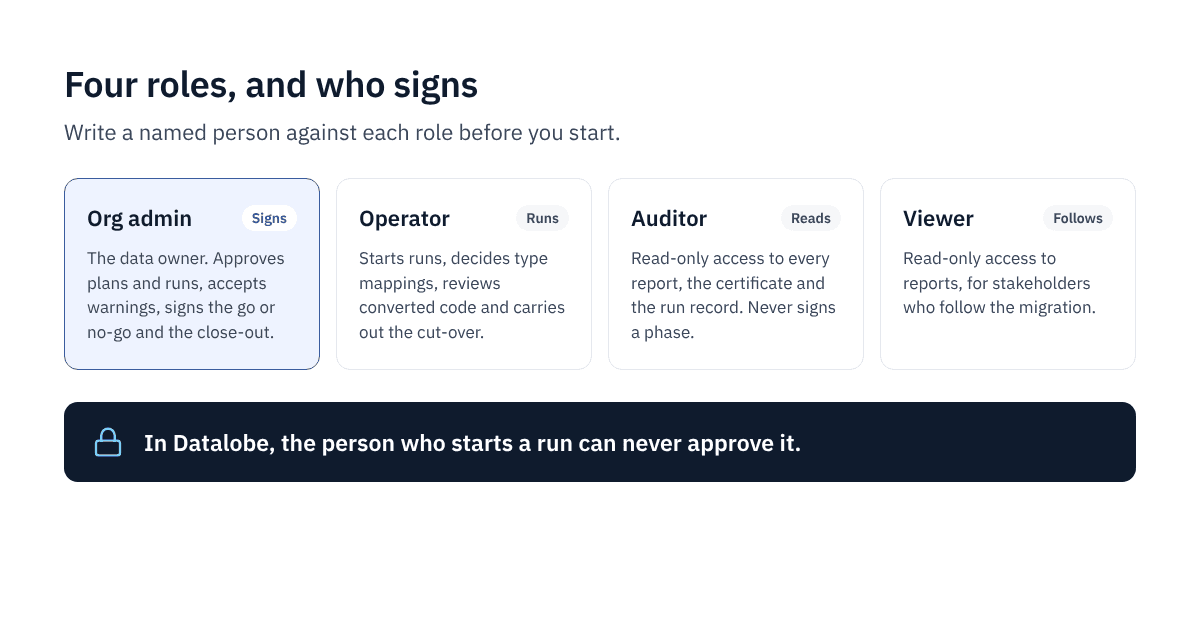
If your job titles differ, write the name of the person who holds each role on the sheet before you start.
In Datalobe, the person who starts a run can never approve it. Every other separation rule on this page is a recommendation for your process.
The Auditor receives a copy of the evidence and reviews it. The Auditor never signs a phase.
Evidence to keep
- The dated master sheet, one per migration.
- A list of named people against each role.
Who signs: the Org admin opens the sheet and owns it.
Phase 1: Scope and inventory
Decide what moves and what does not, and write it down before anything is copied. A scope that lives only in a meeting is a scope nobody can check.
Tick when done
- Export the inventory and date it: schemas, tables, views, indexes, constraints, sequences and code objects.
- List every exclusion with its pattern and the reason it is out of scope.
- Record the source and target versions.
- Confirm the source login is read-only, and keep the test result.
- Count code objects by type before anything moves.
- Name an owner for each schema.
Evidence to keep
- The inventory export: schemas, tables found, tables excluded, tables in scope, and code objects by type.
- The exclusion list with a reason for each pattern.
- The source and target version record.
- The read-only access confirmation.
- The named owner of each schema.
Who signs: the Operator prepares the inventory. The Org admin signs the scope, meaning the list of what is in and what is out.
Example run · ERP-Oracle to ERP-PG, Meridian Retail (example)
- 5 schemas in scope: SALES, FIN, INV, HR and COMMON.
- 1,112 tables found. 76 were excluded by patterns (
*_BKP,TMP_*,ARCH_2019_*). 1,036 were in scope. - 540 code objects: 212 procedures, 96 functions, 24 packages, 88 triggers and 120 views.
- The source was Oracle Database 19c (19.21), read as
DATALOBE_RO. The connection test returned "Read-only login confirmed".
To record tables per schema on a PostgreSQL source, run this query. Run it again on the target later for a before and after record.
SELECT table_schema, count(*) AS tablesFROM information_schema.tablesWHERE table_type = 'BASE TABLE' AND table_schema NOT IN ('pg_catalog', 'information_schema')GROUP BY table_schemaORDER BY table_schema;Tested on PostgreSQL 16.15.
For an Oracle Database source, use the inventory in your assessment and read the Oracle Database to PostgreSQL migration page for path notes.
The free assessment turns a read-only connection or a schema export into an Assessment Report within 5 working days of receiving either.
Phase 2: Mapping decisions and plan approval
Some choices need a person, not a default. Record who decided each one, when, and why. Then approve the written plan before the run starts.
Tick when done
- Log every type-mapping decision with the name of the decider, the date and the reason.
- Record who reviewed each converted code object and whether they accepted, edited or rewrote it.
- Keep the compile-check result. Every converted statement should compile on the target before deploy.
- Write the plan: scope, order, cut-over window and the way back.
- Approve the plan before the run starts.
- Confirm the approver is not the person who started the run.
Evidence to keep
- The mapping decision log: each decision, who made it, when and why.
- The code review record.
- The compile-check result.
- The approved plan, with the time of approval.
Who signs: the Operator records the mapping and code decisions. The Org admin approves the plan, and never approves a run they started.
Example run · ERP-Oracle to ERP-PG, Meridian Retail (example)
- 11 type-mapping rules covered 71,940 columns. 2 needed a decision.
- NUMBER without precision to NUMERIC(38,10): 1,284 columns, decided by Sarah Mitchell, Org admin.
- CHAR(1) 'Y'/'N' to BOOLEAN: 2,906 columns, decided yes.
- Emily Brooks, Marcus Reed and Daniel Ortiz, all Operators, reviewed code from 28 Sep to 1 Oct 2026.
- Daniel Ortiz rewrote
HR.PRC_PAYROLL_CLOSEby hand. - 540 of 540 code objects compiled before deploy.
- Sarah Mitchell approved the plan on 1 Oct 2026 at 16:20 UTC.
Phase 3: Rehearsal and restore test
Run the whole migration once on a full copy before the real run. A rehearsal that only covers a sample tells you little about the night.
Tick when done
- Write the pass criteria before the rehearsal starts, not after you see the result.
- Run the rehearsal end to end on a full copy.
- Prove the restore. Take a backup, restore it on the target, and keep the proof.
- Log every defect with its fix.
- Repeat the rehearsal until it passes. Do not carry on after a failure.
- Keep the record of any failed rehearsal as well.
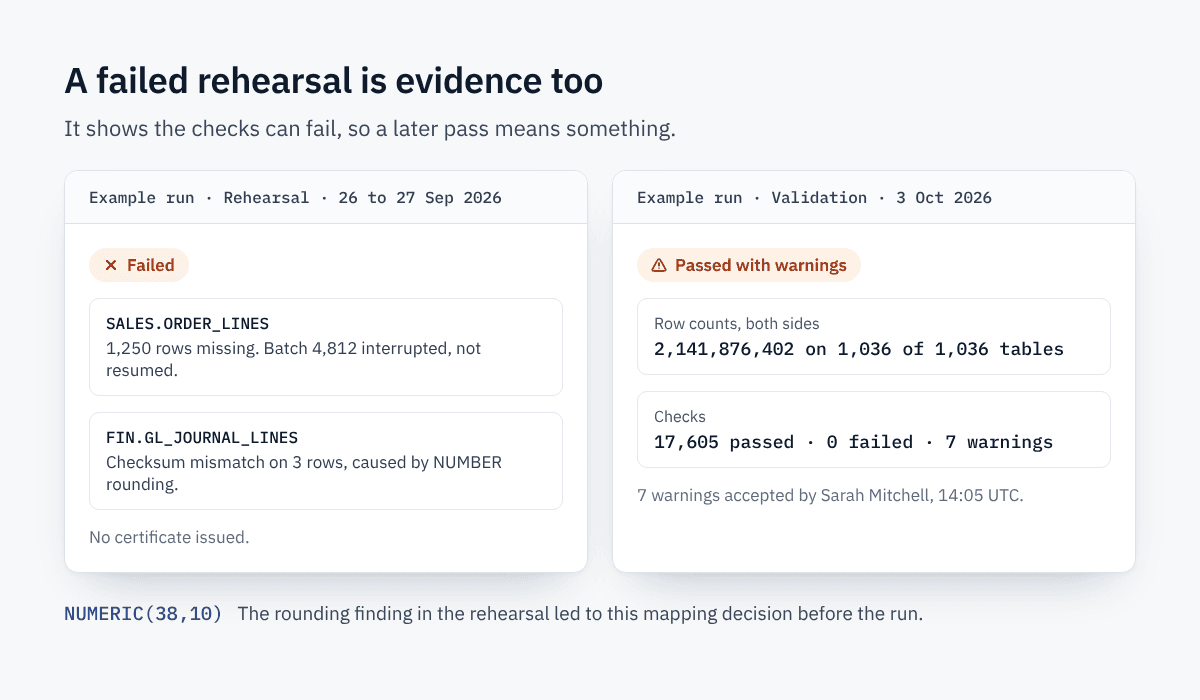
A failed rehearsal is not a setback to hide. Its record shows that the checks can fail, so a later pass means something.
For backup and restore commands, use the PostgreSQL 16 documentation on backup and restore. It covers dump, restore and continuous archiving.
Evidence to keep
- The rehearsal log with its verdict.
- The defect list with the fix for each item.
- The backup and restore proof.
- The pass criteria, as agreed before the run.
Who signs: the Operator runs the rehearsal. The Org admin signs it as accepted. As a recommendation for your process, use a different person from the one who ran it.
Example run · ERP-Oracle to ERP-PG, Meridian Retail (example)
- A rehearsal ran from 26 to 27 Sep 2026 and failed.
SALES.ORDER_LINESwas missing 1,250 rows. Batch 4,812 was interrupted and not resumed.FIN.GL_JOURNAL_LINEShad a checksum mismatch on 3 rows, caused by NUMBER rounding.- The verdict was Failed and no certificate was issued.
- The rounding finding led to the NUMERIC(38,10) decision in Phase 2.
Phase 4: Data copy and keep-in-sync
Watch the copy as it runs, and keep the log. Nothing should be skipped without a record, and every interruption should show its resume.
Tick when done
- Keep the copy log: batches, checkpoints, interruptions and resumes.
- Record every interruption and the resume that followed it.
- Compare the tables completed with the tables in scope. The two numbers must match.
- Record the position where change capture starts.
- Log lag readings at intervals, with the time of each.
- Confirm the source stayed live and the changes kept arriving.
Change data capture (CDC) reads changes on the source and applies them to the target. Lag is how far behind the target is, in seconds.
The source stays live during this phase. New changes keep arriving, which is why the lag readings matter.
Evidence to keep
- The copy log, with batches, checkpoints, interruptions and resumes.
- The tables-completed count against the scope.
- The change capture start position.
- The lag readings with their times.
Who signs: the Operator signs the copy log as complete. Anyone who only needs to follow progress can have read-only access.
Example run · ERP-Oracle to ERP-PG, Meridian Retail (example)
- The data copy ran from 23:10 on 2 Oct to 12:58 on 3 Oct 2026 UTC: 13h 48m.
- It used 50,000-row batches. There were 42,838 batches, with a checkpoint every batch.
- There were 2 resumes after network interruptions.
- Change capture started from source SCN 48,201,775,102.
- 1,204,318 changes were applied between 13:40 on 3 Oct and cut-over.
Phase 5: Validation and accepted warnings
Validation is where the file earns its value. Row counts are the start, not the end, and they miss wrong values, broken keys and missing code.
A matching total can hide one table that is short and another that is long. Compare per table and keep the results.
Tick when done
- Compare row counts per table, not just a total.
- Compare checksums or values for the data itself.
- Check structure and defaults against the plan.
- Check constraints, including foreign keys, and look for orphan rows.
- Confirm code objects are present and compiled.
- Confirm triggers are present and enabled.
- Decide each warning in writing.
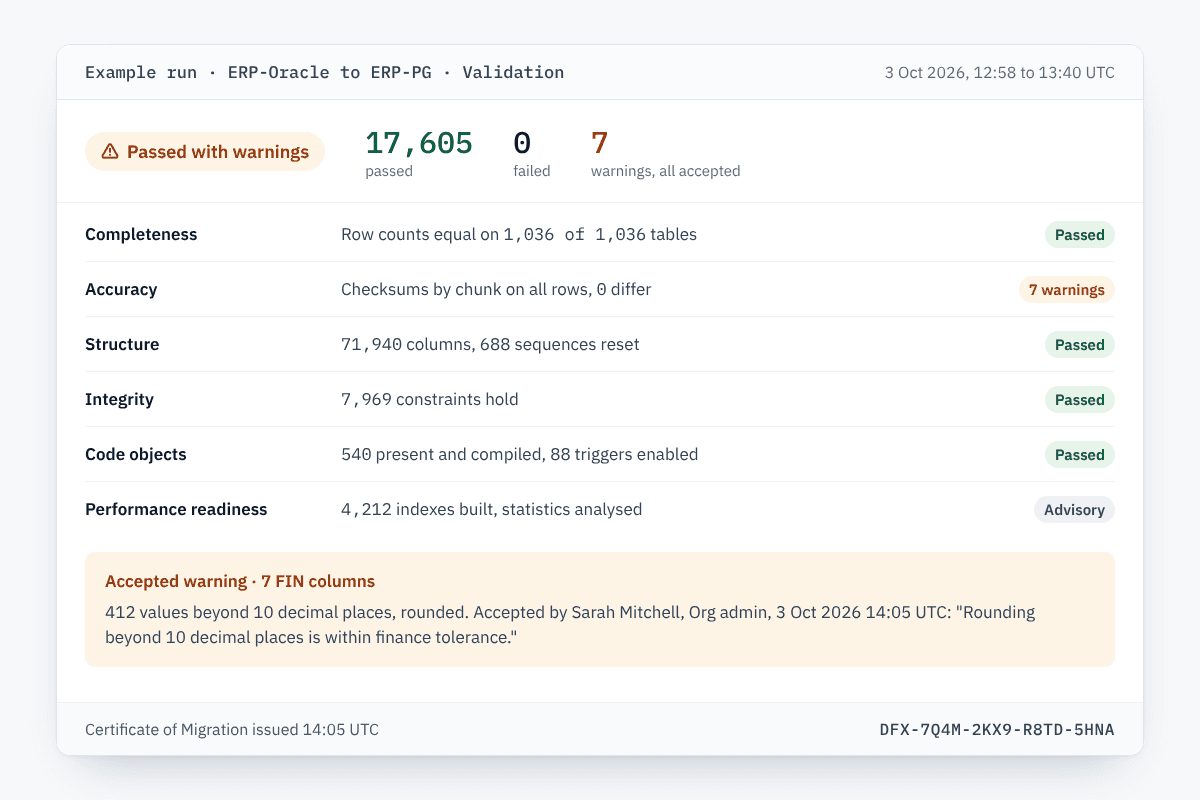
Datalobe groups its 17 checks per table in six groups: Completeness, Accuracy, Structure, Integrity, Code objects and Performance readiness, which is advisory. See data migration validation for how they work.
The result is one verdict: Passed, Passed with warnings, Not verified or Failed. A Failed verdict stops the sheet. Fix the cause, rerun the checks and keep both records.
To run your own check, count rows exactly on the target. This avoids the planner estimates in pg_class, which can be out of date.
SELECT table_schema, table_name, (xpath('/row/c/text()', query_to_xml(format('select count(*) as c from %I.%I', table_schema, table_name), false, true, '')))[1]::text::bigint AS row_countFROM information_schema.tablesWHERE table_type = 'BASE TABLE' AND table_schema NOT IN ('pg_catalog', 'information_schema')ORDER BY 1, 2;Tested on PostgreSQL 16.15.
Run the same count on the source and compare table by table. For the orphan check, create two small tables so you can see what it finds.
CREATE SCHEMA IF NOT EXISTS sales;CREATE TABLE sales.orders (order_id integer PRIMARY KEY);CREATE TABLE sales.order_lines (order_line_id integer PRIMARY KEY, order_id integer);INSERT INTO sales.orders VALUES (1);INSERT INTO sales.order_lines VALUES (10, 1), (11, 2);Tested on PostgreSQL 16.15.
Now look for lines whose order does not exist. Here it returns order 2.
SELECT l.order_idFROM sales.order_lines lLEFT JOIN sales.orders o ON o.order_id = l.order_idWHERE o.order_id IS NULLLIMIT 10;Tested on PostgreSQL 16.15. It returns order 2.
On your own tables, replace the names with each foreign key relationship. An empty result means no orphan rows for that key.
What a reviewer looks for
- Nothing is left unexplained.
- Every warning has a name and a note.
- The verdict matches the results beneath it.
- The dates run in order, from copy to validation to acceptance.
Evidence to keep
- The validation report and its verdict.
- The table-by-table results.
- Each accepted warning, with who accepted it, when, and the note.
- The output of any SQL checks you ran yourself.
- The certificate, where one is issued.
Who signs: the Org admin or an Operator accepts each warning in writing, with a note. The Auditor receives the report and reads it. The Auditor does not accept warnings.
Example run · ERP-Oracle to ERP-PG, Meridian Retail (example)
- Validation ran from 12:58 to 13:40 UTC on 3 Oct 2026: 42 min.
- 17,605 checks passed, 0 failed and 7 warnings.
- The warnings covered 412 values beyond 10 decimal places, rounded, in 7 FIN columns.
- Sarah Mitchell accepted all 7 on 3 Oct 2026 at 14:05 UTC, with the note "Rounding beyond 10 decimal places is within finance tolerance."
- The verdict was Passed with warnings. Row counts of 2,141,876,402 matched on both sides on 1,036 of 1,036 tables.
- Certificate DFX-7Q4M-2KX9-R8TD-5HNA was issued at 14:05 UTC the same day.
Every certificate can be checked against Datalobe's records on a public verification page.
Phase 6: Go or no-go and cut-over
Write the go or no-go criteria down before the night, then decide against them.
A common order for the switch is: freeze writes on the source, apply the last changes, then point the application at the target. Your plan may differ.
Tick when done
- Record that every go criterion was met: accepted verdict, lag under the agreed threshold, restore proven, people on call.
- Note the time writes were frozen on the source.
- Apply the last changes and record when that finished.
- Take a lag reading just before the switch.
- Point the application at the target.
- Log the time of the switch.
Aim for minimal downtime. Truly zero downtime for clients is not possible, and Google Cloud's migration guidance explains why.
Plan the window and say how long you expect it to last.
For the full timeline of a change-capture cut-over, read zero downtime database migration.
When to roll back and who decides
Agree the triggers before the night, not during it. Write down which result sends you back, who calls it, and what happens next.
- List the triggers: for example, a failed smoke test or a lag that will not fall.
- Name the person who calls it.
- Name the steps that follow, and who runs them.
- Keep the rollback scripts with the evidence. A Datalobe package holds DDL and rollback scripts.
Do not treat a rollback route as proven because it exists. Test it in a rehearsal and record the result.
Evidence to keep
- The signed go or no-go record, with the criteria and the readings behind it.
- The cut-over log with times for the freeze, the final apply and the switch.
- The last lag reading.
- The agreed rollback triggers.
Who signs: the Org admin signs the go or no-go. The Operator carries out the cut-over. As a recommendation, the person who executes is not the person who signs.
Example run · ERP-Oracle to ERP-PG, Meridian Retail (example)
- Cut-over took place on 4 Oct 2026 at 02:00 UTC. Application downtime was 18 min.
- Lag at cut-over was 4 s. The readings before it were 12 s, 7 s and 4 s.
- Changes applied were 1,198,442, then 1,204,318.
Phase 7: After cut-over and close-out
The move is not finished at the switch. Check the target as the application uses it.
Retire the source only after written sign-off.
Tick when done
- Record the smoke tests that ran against the new database.
- Check that sequences sit at the right position.
- Check that triggers are enabled.
- Confirm job schedules moved to the target.
- Confirm the application callers have changed where the plan said they must.
- File your evidence file and say who can read it.
- Retire the source only after written sign-off.
Keep a watch period before you retire the source. Set its length by your own policy. The same goes for how long you keep the evidence file.
To list triggers and whether they are enabled, query the system catalogue. In tgenabled, O means the trigger fires in the default modes (origin and local) and D means it is disabled. See the pg_trigger catalogue page.
SELECT tgrelid::regclass AS table_name, tgname, tgenabledFROM pg_triggerWHERE NOT tgisinternalORDER BY 1, 2;Tested on PostgreSQL 16.15. An enabled trigger shows O; a disabled one shows D.
To see where each sequence stands, read the pg_sequences view.
A null last_value can mean the sequence has not been read from yet, or your login lacks USAGE or SELECT.
SELECT schemaname, sequencename, last_valueFROM pg_sequencesWHERE schemaname NOT IN ('pg_catalog', 'information_schema')ORDER BY 1, 2;Tested on PostgreSQL 16.15. A sequence never used shows a null last_value.
Compare both results with the source values you recorded in Phase 1 and Phase 5.
Evidence to keep
- The migration report.
- Your filed evidence file.
- The Datalobe package, if you used it.
- Its five documents: Assessment Report, Migration Plan, Validation Report, Migration Report and Certificate of Migration.
- Its DDL and rollback scripts, execution log and manifest.
- The execution log.
- The smoke test record.
- The decommission approval.
Who signs: the Org admin signs the close-out and the source decommission. The Auditor receives a copy of the evidence file, read-only.
Example run · ERP-Oracle to ERP-PG, Meridian Retail (example)
- 4,212 indexes were built and statistics analysed on 1,036 tables. This is the advisory group.
- 9 procedures that return result sets became set-returning functions. The flag read "caller change needed: CALL to SELECT".
- The
HR.PRC_PAYROLL_CLOSEschedule moved to pg_cron. - The execution log holds 184,302 events.
Printable checklist
Copy this table, print it and fill it in. It has one line per phase.
Phases 1 to 3 are the pre-migration lines. Phase 7 is the post-migration line.
Tick Done, name the evidence you filed, and add the signer's name, role and date. The Auditor gets a copy and does not sign.
| Phase | Done | Evidence filed | Signer name | Role | Date |
|---|---|---|---|---|---|
| Inventory export, exclusion list, version record, read-only confirmation | Org admin | |||
| Decision log, code review record, compile-check result, approved plan | Org admin | |||
| Rehearsal log, defect list, restore proof, pass criteria | Org admin | |||
| Copy log, tables-completed count, capture start position, lag readings | Operator | |||
| Validation report, table results, accepted warnings with notes | Org admin or Operator | |||
| Go or no-go record, cut-over log, last lag reading, rollback triggers | Org admin | |||
| Migration report, evidence file, smoke test record, decommission approval | Org admin | |||
| Final line: sheet complete | All seven lines above filed together | Org admin |
File the completed sheet with the evidence it points to. Send a copy to your Auditor for review.
How Datalobe handles this
Datalobe produces several of these documents during a run. They line up with the phases like this.
| Phase | Document |
|---|---|
| 1 | Assessment Report |
| 2 | Migration Plan |
| 3 and 4 | Execution log |
| 5 | Validation Report, Certificate of Migration |
| 6 | Execution log, rollback scripts |
| 7 | Migration Report |
Datalobe reads the source with a read-only user that you create. The person who starts a run can never approve it.
See the sample reports to read all five documents. The validation page shows the checks behind Phase 5.
Share this article
Frequently asked questions
What should a database migration checklist include?
Scope and inventory, mapping decisions, a rehearsal and restore test, the data copy, validation, cut-over with a rollback route, and close-out. Each phase needs its evidence and a signer.
Who should sign off a database migration?
Name a role for each phase. The person who starts a run in Datalobe can never approve it. Your auditor reads the file and does not approve it.
How do you check data after a database migration?
Compare per table, not just in total. Check counts, values, structure, keys and code objects, then keep the results. The Phase 5 queries show a start.
Is there a printable database migration checklist?
Yes. The table in this article is a printable sheet. Copy it, print it, fill it in, and file it with the evidence from each phase.
What evidence should you keep after a migration?
Keep the inventory, decisions, rehearsal record, copy log, validation results with accepted warnings, cut-over log and close-out sign-off. How long you keep them follows your own policy. [Get a free assessment](/free-assessment)
Sources
About the authors
Datalobe product and engineering staff at Soulpage IT Solutions
The Databloe Editorial Team is the Datalobe product and engineering staff at Soulpage IT Solutions. The team writes the articles and guides on this site about converting code objects, moving data and validating database migrations. Before an article is published, it needs an approved brief, a recorded check that its examples were run, and the final approval of a named reviewer.
- Reviewed by
- Ramesh Damma, Chief Product and Technology Officer, Soulpage IT Solutions
- Last updated
Share this article
Related articles
Zero downtime database migration: how close can you get?
By Datalobe Editorial Team, , 11 min read
Zero downtime database migration is a goal, not a guarantee. See how CDC, a lag gate and a rehearsed cut-over keep downtime minimal, with tested SQL.